Guide · with a free thank-you video maker

How to make a group thank you video from many people’s messages

Ask everyone for a short clip, gather them in one place, then join them into a single film. Here is the message to send and the tips that make the clips usable.

Free, no account needed

To make a group thank you video, send everyone the same short request (what to say, how long, which way to hold the phone and the deadline), collect the clips through a chat, email or a shared folder, then join them in one editor with a title, a closing message and a song. One organiser gathering ten- to twenty-second clips from each person is the whole method.

The maker on this site handles the last part: it works with the clips once they are on your device and saves the finished video there, without uploading anything. It does not collect messages from other people for you, so the collecting is done with whatever your group already uses. For a whole class thanking a teacher, see organising a class video, which adds consent and fairness for children.

How to collect and join the messages

  1. Choose the shape and tell everyone

    Decide where the video will be watched and set Format to match: Landscape 16:9 for a screen at a leaving do, Vertical 9:16 for a phone. Then ask everyone to film the same way round.

  2. Send the request

    Copy the message below into the group chat or an email, with a deadline about a week before you need the video.

  3. Gather the clips in one place

    Save each one with the sender’s name in the file name as it arrives, so you can see who is still missing and send a friendly nudge.

  4. Join them from a template

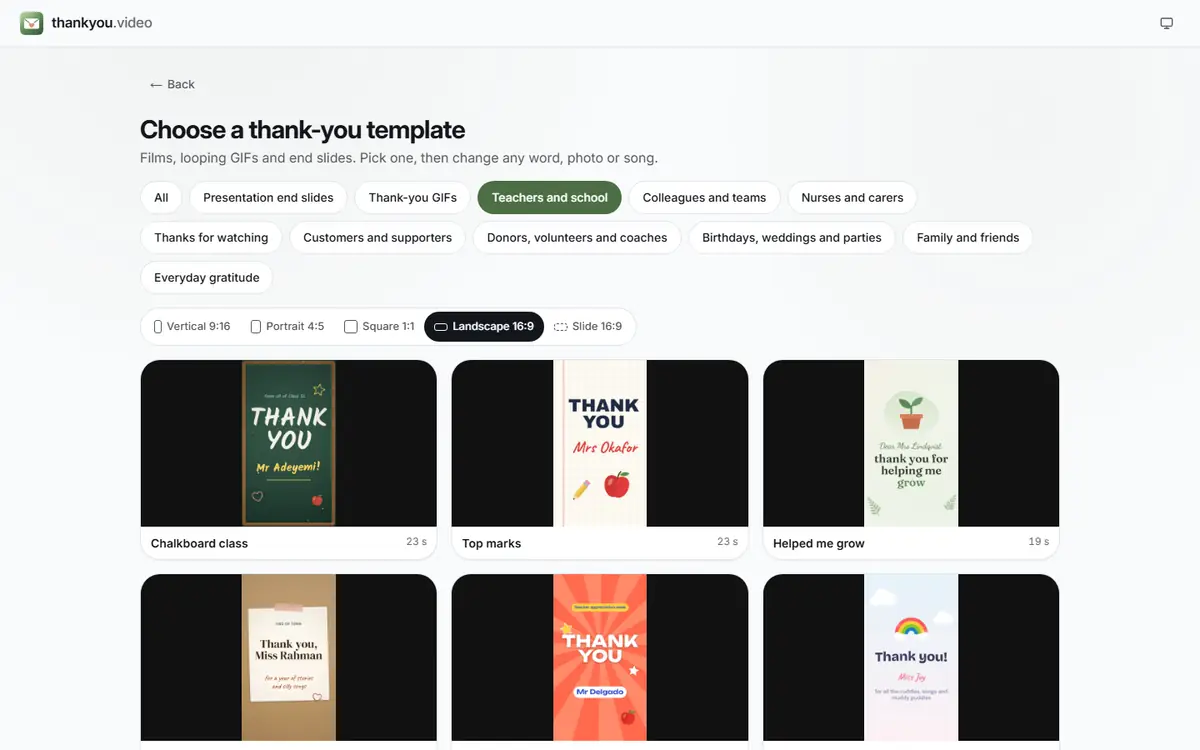
    Pick a design in Templates, press Add photos or clips and pick the clips in the order they should play; drag a scene along the strip of scenes to move it later. Write a title and a closing line in Text and add a quiet song under Music.

    The template picker headed “Choose a thank-you template”, with occasion buttons from Presentation end slides to Everyday gratitude, Teachers and school selected, a row of shapes from Vertical 9:16 to Slide 16:9, and teacher designs such as Chalkboard class, Top marks and Helped me grow (enlarge image)

    The template picker: choose an occasion, then a shape, then a design.

  5. Export and share it

    Watch it through with Play, press Export video, then Download video. Play it at the event or send the file to the person you are thanking.

Templates to start from

Open one to start; every word, photo and the shape can be changed. All colleagues and teams templates

A request you can copy

Paste this into your group chat or email and change the parts in brackets:

“Hi everyone, we’re making a surprise thank-you video for [name] for [reason]. Could you film a short message, 10 to 20 seconds, saying thank you and one thing you’ll remember? Please hold your phone [sideways / upright], stand somewhere bright and quiet, and send it to [me / the shared folder] by [day and date]. Please keep it a secret!”

Keeping it to one paragraph matters: people skim group messages, and a long brief gets ignored.

Filming tips to share with contributors

  • Hold the phone the same way as everyone else. Sideways for a landscape video, upright for a vertical one. A mix of both leaves black bars or cropped heads.
  • Face a window. Daylight on the face beats any lamp; avoid standing with the window behind you.
  • Find a quiet room and hold the phone at arm’s length or closer, so the voice is clear without a microphone.
  • Keep it to 10 to 20 seconds. One thank-you and one memory is plenty.
  • Leave a second of silence at the start and end, so the clip can be trimmed cleanly.

Ways to collect the clips

A group chat

Easiest for small groups. Messaging apps often compress video, which is fine for a phone-sized film but can look soft on a big screen. Ask people to send it as a file or document if the app offers that.

Email

Works for colleagues, but large clips can exceed attachment limits. A short clip of 10 to 20 seconds usually fits.

A shared cloud folder

Best for twenty or more people and keeps the original quality. Make a folder in the cloud storage your group already uses and share an upload link. Download everything to your device before you start editing.

Putting the clips in order

Open with a title card and the warmest or funniest clip, put the longest-serving people or closest friends near the end, and close on a group photo with a line such as those in the thank you message ideas. Twenty clips at fifteen seconds each runs to five minutes, so ask people to cut slow starts before they send, or shorten long clips in your phone’s Photos app before adding them. Gathering everything on one iPhone? The iPhone guide shows where the files end up.

For a colleague who is moving on, the leaving video page has ideas for the running order and the tone, and the thank you video ideas suggest formats beyond a straight run of messages.

Group thank you video questions

How do I get video messages from lots of people?

Send one short request with a clear deadline to a group chat, email list or shared folder, and collect everything in one place yourself. A reminder two or three days before the deadline brings in most of the stragglers.

Can people upload their clips to this site?

No. The maker never receives anyone’s files; it only works with clips already on your device. Collect them first with a chat, email or a shared folder, then add them.

Should the clips be landscape or portrait?

Whichever matches the video you are making. Landscape suits a screen at an event; portrait suits a video watched on phones. What matters most is that everyone films the same way.

How long should each message be?

Ten to twenty seconds each. With more than fifteen people, aim for the lower end so the whole video stays under about four minutes.

What if someone can’t film a video?

Ask for a photo and a written line instead, and show the line on screen over the photo. It keeps them in the video without putting them on camera.

How do I keep the video a surprise?

Use a separate group chat or email thread that leaves out the person being thanked, and put “please keep it a secret” in the request. Name files by contributor rather than by the recipient.